
Extension System
Extension System
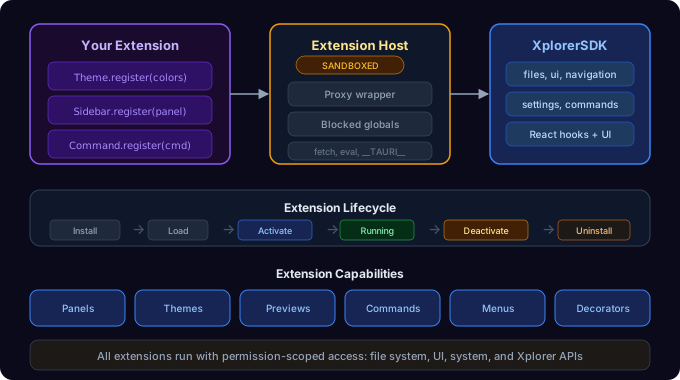
Xplorer's extension system lets you add custom panels, file preview handlers, context menu actions, themes, file decorators, and scoped commands — all driven by a manifest and a sandboxed runtime API.

Architecture
Extension Host
The Extension Host (extension-host.ts) is a singleton that manages the full lifecycle of every extension — both built-in and third-party. It maintains registries for:
- Panels — custom sidebar/bottom UI rendered in the right sidebar
- Commands — named functions extensions can register and invoke
- File decorators — badges, colors, and tooltips on files in the grid
- Context menu items — entries appended to the right-click menu
Sandboxed API
Every extension receives a XplorerAPI object whose methods are gated by the permissions declared in the extension's manifest. Attempting to call files.write() without the file:write permission throws an error immediately.
Backend
The Rust backend (src-tauri/src/extensions/) handles:
- Installation — copies extension files into the extensions directory, validates the manifest
- Activation state — persists which extensions are active across app restarts via
active_extensions.json - Extension-scoped storage — per-extension key-value store persisted to
extension_storage.json - Permission validation — checks that declared permissions are recognized
Extension Lifecycle
Install  →  Load  →  Activate  →  Running  →  Deactivate  →  Uninstall
                          │                        ▲
                          └── Hot Reload ──────────┘
- Install — extension folder is copied into the app data extensions directory
- Load — the Extension Host reads the manifest and registers declared contributions (panels, commands, menus)
- Activate — the extension's code runs, receiving the sandboxed
XplorerAPI - Running — the extension's panels render, commands respond, decorators apply
- Deactivate — cleanup; panels and commands are hidden but not removed
- Uninstall — all files and registrations are permanently removed
What Extensions Can Do
| Capability | SDK API | Permission Required |
| --------------------------- | ------------------------ | ------------------------- |
| Custom color themes | Theme.register() | xplorer:themes |
| Right sidebar panels | Sidebar.register() | ui:panels |
| Left sidebar tabs | SidebarTab.register() | ui:panels |
| Bottom panel tabs | BottomTab.register() | ui:panels |
| Custom file previews | Preview.register() | file:read |
| Custom file editors | Editor.register() | file:read, file:write |
| Context menu items | ContextMenu.register() | -- |
| Commands with shortcuts | Command.register() | -- |
| File decorators (badges) | any | -- |
| Read/write files | any | file:read, file:write |
| Scoped key-value storage | any | -- |
| Navigate the file explorer | any | -- |
Bundled Extensions
Xplorer ships with 25 extensions that use the same extension APIs as third-party extensions. They are active by default but can be toggled on or off.
Themes (5)
| Extension | Description | | -------------- | ------------------------------------------------------------------------------- | | Tokyo Night | Dark theme inspired by downtown Tokyo at night with vibrant blues and purples | | Dracula | Iconic dark theme with pink, purple, green, and cyan accents | | Nord | Arctic north-bluish clean and elegant palette | | Cyberpunk | Neon-soaked futuristic theme with electric yellow and hot cyan | | Ocean Deep | Deep navy and teal hues with bioluminescent accents |
Code and Editing (2)
| Extension | Description | | ----------- | ------------------------------------------------------------------------------- | | Code Editor | Full syntax-highlighted editor powered by CodeMirror 6 with search/replace | | IDE Mode | IDE-style interface with project sidebar, file tree, and project detection |
File Tools (8)
| Extension | Description | | -------------------- | ------------------------------------------------------------------------ | | File Hasher | Calculate file hashes (SHA-256, SHA-1, MD5) from the context menu | | JSON Formatter | Format, minify, and validate JSON files from the context menu | | Word Counter | Count words, lines, and characters via command palette | | Batch Image Processor| Batch resize, convert, and compress images | | Image Editor | Rotate, flip, crop, brightness, contrast, and grayscale adjustments | | 3D Model Viewer | View STL and OBJ models with WebGL rendering | | SQLite Browser | Browse and query SQLite databases with table exploration | | Folder Statistics | File type distribution, size breakdown, and largest files in a sidebar |
Integrations (6)
| Extension | Description | | ------------- | -------------------------------------------------------------------------- | | Git | Full Git GUI with commit graph, branches, blame, staging, stash, remotes | | Google Drive | Multi-account Google Drive browsing, upload, download, and file management | | Docker Manager| List, start, stop, remove containers and images, view logs | | SSH Manager | Remote server browsing via SSH/SFTP with saved connections | | Claude Code | Run Claude Code AI commands from a bottom panel tab | | Collaboration | Multi-user shared browsing, file transfer, chat, and team workspaces |
Productivity (4)
| Extension | Description | | ---------------------- | ------------------------------------------------------------------- | | Architecture Visualizer| Visualize project structure as a tree and interactive graph | | Incremental Backup | Create and manage incremental backups with change tracking | | Problems Panel | Directory diagnostics with customizable problem detection rules | | Software Finder | Search and navigate to installed application paths |
Built-in Panels (8)
In addition to the 25 extensions above, Xplorer includes 8 built-in panel extensions:
| Panel | Description | | ----------------- | --------------------------------- | | File Preview | Preview files in the sidebar | | AI Chat | Chat with AI about your files | | Similar Files | Find related files | | Content Search | Search file contents | | File Organizer | AI-powered file organization | | Storage Analytics | Disk usage breakdown | | Duplicate Finder | Find duplicate files | | Notes | Attach notes to files and folders |
Extension Directory
Extensions are stored in the app data directory:
{app_data}/extensions/
├── my-extension/
│   ├── package.json      ← manifest lives in "xplorer" field
│   └── dist/
│       └── index.js      ← compiled entry point
└── another-extension/
    ├── package.json
    └── dist/
        └── index.js
Next Steps
- Getting Started — scaffold and install your first extension
- Creating Extensions — in-depth guide for each extension type
- SDK Reference — full API documentation
- Manifest Reference —
package.jsonconfiguration - Permissions — permission system reference