
Search & Tokenizer
Search & Tokenizer
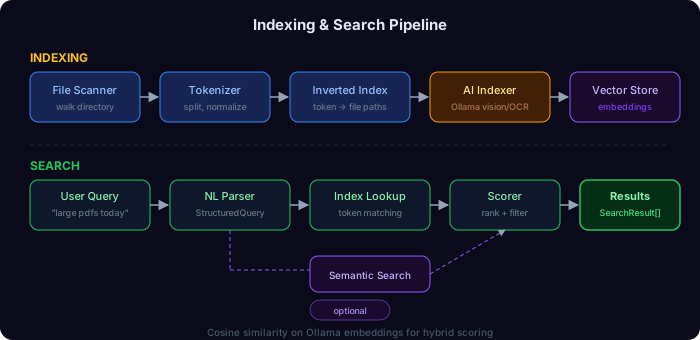
Xplorer includes a powerful search engine that tokenizes file contents and builds an inverted index for instant full-text search.

How It Works
Natural Language Search

Xplorer can parse natural language queries and extract structured filters:
| Query | Interpretation | | ------------------------------ | ----------------------------------------------------- | | "large videos from last month" | Filter: size > 100MB, type: video, date: last 30 days | | "python files in documents" | Filter: extension: .py, path contains: documents | | "photos from 2024" | Filter: type: image, date: year 2024 | | "small text files" | Filter: size < 1MB, type: text |
The NLP parser (enhanced_natural_language_search) supports:
- Size filters: "large", "small", "tiny", "huge"
- Type filters: "images", "videos", "documents", "code", "audio"
- Date filters: "today", "this week", "last month", "from 2024"
- Path filters: Directory name keywords
- Synonym expansion: "pics" → "images", "docs" → "documents"
AI-Enhanced Indexing
When Ollama is available, Xplorer can generate AI descriptions for files that don't contain searchable text:
Image Indexing
Uses vision models (LLaVA, bakllava, moondream) to:
- Generate natural language descriptions of images
- Extract tags and categories
- These descriptions become searchable tokens
Semantic Search
Uses embedding models (nomic-embed-text, all-minilm) to:
- Create vector embeddings of file content
- Find semantically similar files (not just keyword matches)
- "Find files related to machine learning" finds relevant files even without exact keyword matches
Tokenizer Settings
Configure via the Settings page or the TokenizerSettings API:
| Setting | Default | Description |
| ------------------------ | ------------------- | ---------------------------- |
| enabled | true | Enable/disable the tokenizer |
| max_file_size | 10 MB | Skip files larger than this |
| blacklisted_extensions | exe, dll, bin, etc. | Skip these file types |
| indexed_paths | [] | Directories to index |
Index Persistence
The token index is saved to token_index.json in the app data directory. On startup:
- Load the existing index from disk
- When
rebuild_indexis called, reuse cached tokens for unchanged files - Only re-extract content for new or modified files
- Save the updated index back to disk
This means the first indexing of a large directory may take time, but subsequent re-indexes are near-instant for unchanged files.